
1. Set up your business phone
Configure the phone and answering workflow for your business. Confirm the number, transfer destination and what the assistant should say before sending customer calls to it.
Keep a customer inquiry moving while you are on site. Full Service Pro's AI phone answering can ask about the work, take a message or transfer the call, and keep the transcript with the lead.
14 days free · No credit card · Plans from $79/mo, billed monthly
Configure the phone and answering workflow for your business. Confirm the number, transfer destination and what the assistant should say before sending customer calls to it.
The receptionist asks about the work and takes a message or transfers the call. Review the caller’s details and transcript in your inbox.
Call the customer back, clarify the scope and draft an estimate. You review estimate line items before sending them; phone answering itself handles live conversations.
The sample inbox shows the job request and notes captured during a fictional call. Open the tour to follow that request into an estimate, a scheduled job and an invoice.
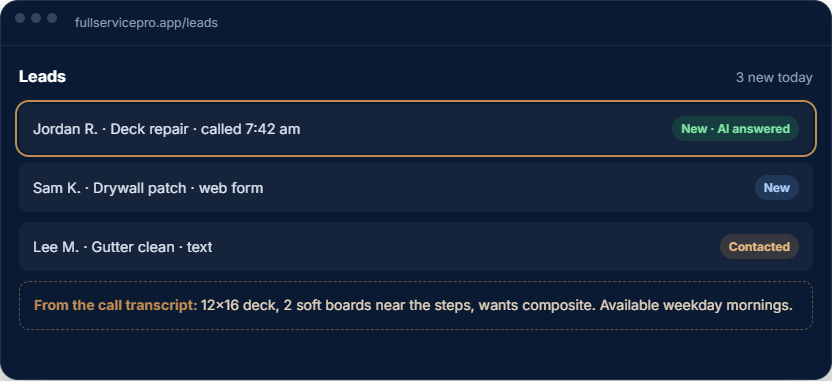
Use an AI answering service for inquiries that arrive while you are driving, measuring or working with a customer. Configure the greeting and transfer workflow for your business, then test typical calls before relying on it.
This is call answering and lead capture. Confirm your booking and calendar requirements in a demo rather than assuming every caller can be booked automatically.
AI answering requires the business phone. On Starter and Pro, the phone base is $15/mo and AI answering is $29/mo, in addition to the software plan. Team includes these features.
Included allowances and overage rates apply. A live AI conversation uses both phone minutes and AI usage, so compare your expected call volume on the full pricing page. Adding text or choosing the communications bundle changes the total.
For a fictional call about a sticking door and a loose cabinet hinge, the useful next step is a clear message: who called, where the work is and what they need help with. Review the transcript, clarify the repair scope and decide whether a site visit is needed before quoting.
Set the business details and transfer destination. Decide what callers should hear when you cannot take the call.
Call the configured number and check how a message or transfer is handled. Verify the captured details before forwarding customer calls.
Use the message to start the conversation. The call itself does not confirm a diagnosis, job price or appointment.
For after-hours handyman inquiries, verify the configured answering hours and transfer behavior during setup. Phone provisioning, plan allowances and usage charges apply.
Every plan includes AI estimate drafting. Field operations, job costing, phone, text and AI answering depend on the plan and add-ons you choose.
per month, billed monthly
1 seat, assign it as office or field
For an owner managing customers, estimates, scheduling and invoices. Add field operations or phone tools when you need them.
Try Starterper month, billed monthly
5 seats, with GPS and job costing
Includes field operations with GPS and dispatch, plus job costing. Phone, text and AI answering are optional additions.
Try Proper month, billed monthly
8 seats, with phone, text, and AI answering, then add seats
Includes field operations, job costing, phone, text and AI answering. Usage charges apply beyond included allowances.
Try TeamAnnual billing options are available. Extra seats, add-ons and communications usage can change your total. Payroll, HR and accounting are separate options. See current pricing, allowances and add-on rates.
The software trial lasts 14 days and requires no credit card. Check phone provisioning and usage terms before setting up live call answering.
AI estimate drafting is included on every plan. Phone answering is different: Starter and Pro can add the business phone and AI answering; Team includes them. Allowances and usage charges apply.
No. The estimate assistant creates a draft for you to review. The receptionist answers live calls according to the workflow you configure; this is separate from approving an estimate.
The answering workflow can transfer a call or take a message. Confirm your transfer number and test the complete call flow during setup.
The software trial requires no credit card. Phone provisioning and live communications can have separate setup and usage requirements; confirm these in a demo before routing customer calls.
No card, no sales call. If it doesn't save you time in two weeks, walk away.