
Keep customer information together
Store the customer, job scope, notes and estimate in one place. See what needs a reply before opening a separate calendar or invoice.
Run your home service business from the first customer inquiry to the final invoice. Full Service Pro connects contractor CRM, AI estimates, job scheduling and payments, with options for solo owners and growing crews.
14 days free · No credit card · Plans from $79/mo, billed monthly
Store the customer, job scope, notes and estimate in one place. See what needs a reply before opening a separate calendar or invoice.
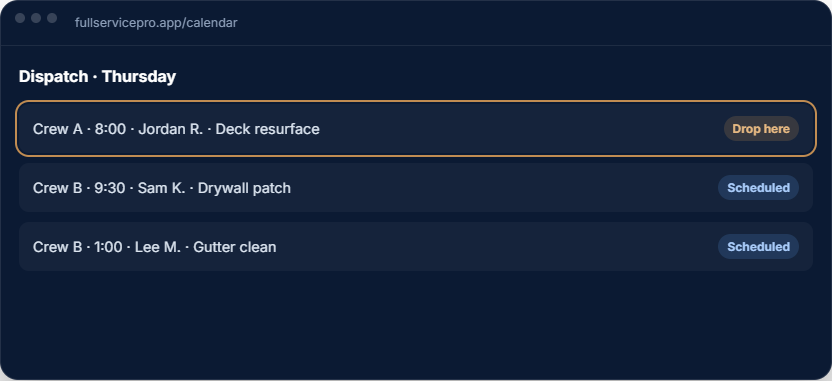
Assign the job and share the approved scope with your crew. Add field operations when you need dispatch and GPS tools.
Use the job details to prepare the bill. Send a payment link and track the invoice without rebuilding the customer record.
Review the next job, the assigned crew and the work to do. The sample tour follows a fictional deck job through estimate approval, scheduling and payment.
Start with one seat for your office and field work. Build your customer list, price book and first estimate before adding more tools. If you do the work yourself, check the field-operation add-on against what you actually need on site.
When jobs move between the office and technicians, evaluate seat counts, dispatch, GPS time and job costing together. Pro includes five seats and these field tools; Team includes eight seats and adds phone, text and AI answering, with usage allowances.
Every plan includes AI estimate drafting. Field operations, job costing, phone, text and AI answering depend on the plan and add-ons you choose.
per month, billed monthly
1 seat, assign it as office or field
For an owner managing customers, estimates, scheduling and invoices. Add field operations or phone tools when you need them.
Try Starterper month, billed monthly
5 seats, with GPS and job costing
Includes field operations with GPS and dispatch, plus job costing. Phone, text and AI answering are optional additions.
Try Proper month, billed monthly
8 seats, with phone, text, and AI answering, then add seats
Includes field operations, job costing, phone, text and AI answering. Usage charges apply beyond included allowances.
Try TeamAnnual billing options are available. Extra seats, add-ons and communications usage can change your total. Payroll, HR and accounting are separate options. See current pricing, allowances and add-on rates.
The software trial lasts 14 days and requires no credit card. Check phone provisioning and usage terms before setting up live call answering.
Both. Customer and lead records connect to estimates, scheduled jobs and invoices. Field operations adds dispatch and GPS; availability depends on your plan.
Yes. Starter includes one seat that can be assigned as office or field. Compare any field-operation and phone add-ons you need before choosing a plan.
You can import customers from a spreadsheet or QuickBooks Online. Review a small sample before importing your full list. Customer imports do not mean that every historical job or document transfers automatically.
Create a customer, draft an estimate using your own rates, schedule the work and prepare an invoice. Check the workflow on the devices your crew uses before moving your business.
No card, no sales call. If it doesn't save you time in two weeks, walk away.