
Price the small job
Capture the scope and use your price book to draft a quote. Review labor, materials and exclusions before the customer sees the estimate.
Manage handyman customers, quotes, job schedules and invoices in one app. Draft estimates with AI, review your prices and keep the work moving through payment.
14 days free · No credit card · Plans from $79/mo, billed monthly
Capture the scope and use your price book to draft a quote. Review labor, materials and exclusions before the customer sees the estimate.
Schedule approved work and keep the address, checklist and notes with the job. Choose field operations when you need dispatch and GPS.
Prepare the invoice from the job, check any agreed changes and send a payment link. Keep the payment status with the customer record.
The sample job uses fictional deck-repair details and prices. Try the estimate, approval and invoice steps, then use your own price book during the software trial.
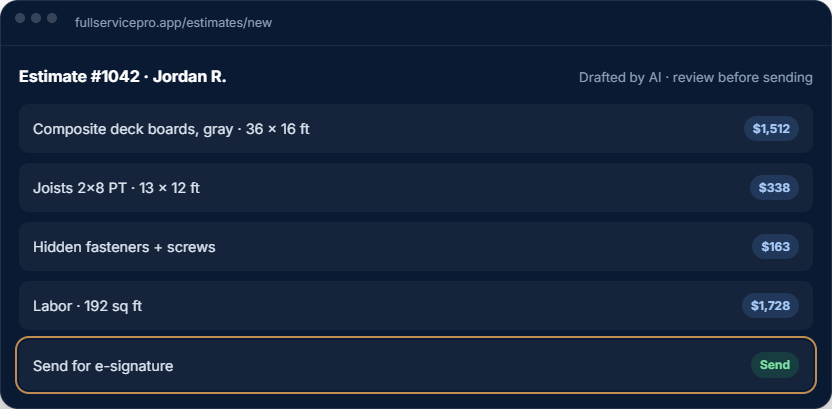
Use a fictional sticking-door repair to evaluate the process. The steps below describe what to check in your software trial; the linked tour is an illustration, not a recording of the production app.
Create a sample customer and service address. Record the door, the adjustment requested, photos and access notes. Exclude replacement or concealed damage until inspected.
Use the free handyman estimate template to separate scope, labor and materials before entering prices.
Draft from your own price book. Check quantities, labor, materials, allowances and exclusions. AI output is a starting point; approve the final scope and price before sending anything.
Record customer approval. Extra repairs need their own agreed scope and price rather than an unexplained invoice increase.
Keep the approved details with the job. Check the address, materials and arrival window, then record completion notes and prepare the invoice from the work actually agreed and completed.
Use the crew dispatch checklist when more than one person needs the handoff.
One Starter seat can be assigned to office or field use; additional seats and field operations can add cost. Phone answering needs provisioning and an appropriate plan or add-ons. Verify the mobile and offline tasks you depend on with your own devices during the trial.
Check your customer import before moving existing records. Customer contacts, historical attachments and accounting balances are separate migration questions.
Starter includes one seat for office or field use. Check your mobile and field-operation requirements before choosing add-ons.
Pro includes five seats, GPS and dispatch through field operations, and job costing. Share the job details instead of recreating them for the crew.
Add the business phone and AI answering on Starter or Pro, or use the included features on Team. Check usage allowances and overages.
Keep a door adjustment, cabinet repair and wall patch on one job without losing the detail that makes each repair clear.
Use your price book or reusable estimate lines. Record the location, quantities, finish and exclusions, then review the estimate before asking the customer to approve it.
Keep job notes, photos and field checklists with the assignment. Give each repair a reference so your crew's questions and completion notes point to the same scope.
Compare the completed repairs with the original estimate and approved changes. Check recorded labor, materials and the invoice recipient before closing out the work.
Start with one shared job: the accepted scope, address, access notes, materials and the person responsible. Test how the helper sees their assignment and records time on the phone they will use.
Check seat permissions, field-operation options and time-tracking requirements against your plan. A shared schedule is most useful when the crew can also find the details needed to do the work.
Agree who handles a missing material, an extra repair or a job that needs a second visit. Record the decision on the job so the owner and helper are working from the same instructions.
Every plan includes AI estimate drafting. Field operations, job costing, phone, text and AI answering depend on the plan and add-ons you choose.
per month, billed monthly
1 seat, assign it as office or field
For an owner managing customers, estimates, scheduling and invoices. Add field operations or phone tools when you need them.
Try Starterper month, billed monthly
5 seats, with GPS and job costing
Includes field operations with GPS and dispatch, plus job costing. Phone, text and AI answering are optional additions.
Try Proper month, billed monthly
8 seats, with phone, text, and AI answering, then add seats
Includes field operations, job costing, phone, text and AI answering. Usage charges apply beyond included allowances.
Try TeamAnnual billing options are available. Extra seats, add-ons and communications usage can change your total. Payroll, HR and accounting are separate options. See current pricing, allowances and add-on rates.
The software trial lasts 14 days and requires no credit card. Check phone provisioning and usage terms before setting up live call answering.
Yes. Estimates, customers, jobs and invoices are connected. Review your scope and prices before sending an estimate or invoice.
Yes. Starter includes one seat. Field operations and communications depend on your selected plan and add-ons.
Team includes phone and AI answering with usage allowances. Starter and Pro can add them. Live communications usage and setup requirements differ from the software trial.
Yes. Create a trial account without a credit card and test a customer, estimate, scheduled job and invoice. Use sample information while you evaluate the workflow.
No card, no sales call. If it doesn't save you time in two weeks, walk away.