
Assign the next job
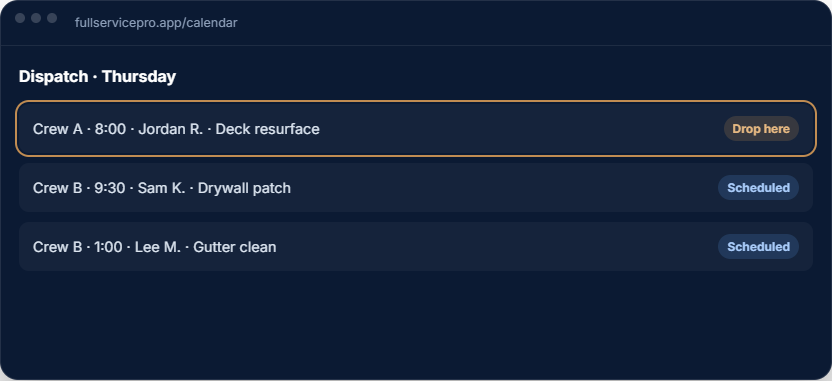
Use the calendar and daily dispatch board to place approved work and assign a crew. Review who is doing the work and what the job requires.
Assign work, share job notes and keep track of the day in Full Service Pro. The calendar and dispatch board connect to the customer, estimate and job instead of a separate list of appointments.
14 days free · No credit card · Web and Android
Use the calendar and daily dispatch board to place approved work and assign a crew. Review who is doing the work and what the job requires.
Crews can open their route, job notes and checklists on their phones. Keep site photos and receipts with the work so the office can follow the job.
Track crew time and job progress, then use the job record for costing and invoicing. Reduce the handoff between the schedule and the information you need to bill.
Start with the customer and job book, then choose the field tools your work needs. Pro and Team include field operations with GPS and dispatch; Starter can add them separately.
Check plans and field-operation options before choosing. Your trial account does not require a payment card.
Use contractor estimating software to get the scope approved before assigning the work. Keep the approved details available as the job moves through the calendar, the field and invoicing.
Explore scheduling and dispatch features, handyman software or remodeling software.
Review a sample dispatch day, then follow the approved work into the field and through invoicing. In your trial, check crew assignments and job details on the devices you use.
Use two fictional jobs and the actual phones your team uses. This is a trial checklist, not a promise that the software automatically makes these decisions.
Assign both crew members to the work. Check that each can find the customer, service address, approved scope, arrival window and job notes. Allow time for supplies, travel, setup and cleanup.
Move the next assignment after agreeing a new arrival window with the customer. Check the updated job on each crew member's device, including after a refresh. Confirm who handles the customer notification.
Record completion notes, time, receipts and any approved extra work. Open the same job from the office and confirm the details needed for costing and invoicing are present.
Read the daily dispatch example and download the free checklist.
Pro and Team include field operations with GPS and dispatch; Starter adds those separately. Browser and Android behavior can differ. Test any offline workflow you need before depending on it, and confirm how the crew sees assignment changes.
Prepare the scope with our handyman estimate worksheet. If you are changing systems, use the customer-import checklist before moving records.
Every plan includes AI estimate drafting. Field operations, job costing, phone, text and AI answering depend on the plan and add-ons you choose.
per month, billed monthly
1 seat, assign it as office or field
For an owner managing customers, estimates, scheduling and invoices. Add field operations or phone tools when you need them.
Try Starterper month, billed monthly
5 seats, with GPS and job costing
Includes field operations with GPS and dispatch, plus job costing. Phone, text and AI answering are optional additions.
Try Proper month, billed monthly
8 seats, with phone, text, and AI answering, then add seats
Includes field operations, job costing, phone, text and AI answering. Usage charges apply beyond included allowances.
Try TeamAnnual billing options are available. Extra seats, add-ons and communications usage can change your total. Payroll, HR and accounting are separate options. See current pricing, allowances and add-on rates.
The software trial lasts 14 days and requires no credit card. Check phone provisioning and usage terms before setting up live call answering.
Yes. Keep the customer and approved scope with the job, then assign the work on the calendar and dispatch board.
Crews can use the Android app or a phone browser for job details, checklists, photos and receipts. Offline capabilities depend on the app and workflow.
Field operations, including GPS and dispatch, are included in Pro and Team. Starter can add field operations separately. Check the pricing page for the current plan details.
The sample tour needs no account. The software trial is free for 14 days.
No card, no sales call. If it doesn't save you time in two weeks, walk away.