1. Describe the work
Give the assistant the job description, measured quantities, material choices, access and what is excluded. Add a site photo when it helps explain the condition. More specific scope gives you a better draft to evaluate.
Describe the job, add a site photo and start with a draft of the labor and materials. Full Service Pro uses your price book and labor settings so you can review the numbers, approve the scope and move the work into a job.
Example: no signup ? AI assistant: 14-day software trial, no card ? Included in every plan
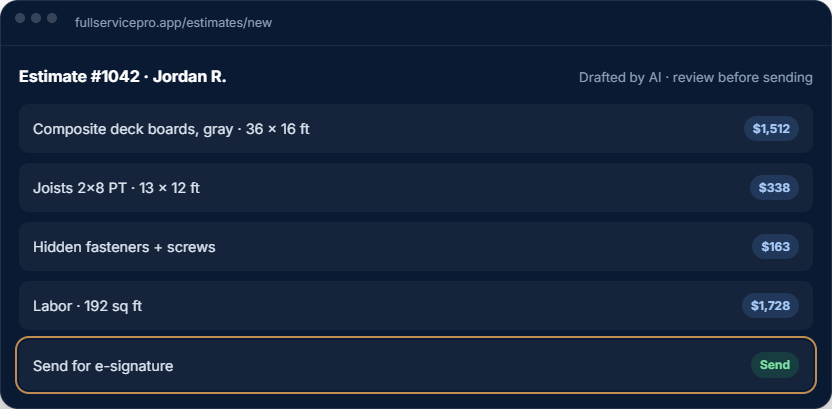
Try the existing deck example to see materials and labor separated into line items. Change the width and length, then choose Build example.
This example uses fixed calculations and sample prices. It does not call the AI, inspect a photo or use your price book. Use the software trial to evaluate the actual estimator with your own job details and rates.
The example omits site-specific design, permits, tax and other costs. It is an illustration, not a construction design, complete purchase list or customer quote. Verify actual measurements, specifications and supplier prices for a real job.
 Deck estimate examplesample
Built for contractors preparing repair, maintenance and remodeling estimates.
Give the assistant the job description, measured quantities, material choices, access and what is excluded. Add a site photo when it helps explain the condition. More specific scope gives you a better draft to evaluate.
Review the proposed lines against your price book. Confirm units, quantities, costs, labor hours and company rates. Check the source of the prices; a missing catalog match or model suggestion still needs a decision.
Add or skip proposed items, correct assumptions and set the final scope. Customers can approve and sign online. Keep the accepted work with the customer, scheduled job and invoice.
Replace 120 square feet of laminate flooring in one room. Remove and dispose of the existing floor. Keep reusable baseboards. Customer will select the finish; confirm the supplier cost before pricing materials. Include installation, transitions and cleanup. Inspect the subfloor first; repairs to concealed damage are excluded until separately approved.
This is a fictional scope-writing example, not an AI-generated result. In your trial, replace it with your own measurements, work conditions, material specifications and pricing.
Use the free handyman estimate worksheet to organize the scope before generating or sending a quote.
The estimator looks up your catalog and applies company labor settings. For work without a reliable catalog match, check the pricing source and review any suggested cost, hours or unpriced line. Do not assume every material has a current supplier quote.
Keep reusable items and document templates for work you price repeatedly. Confirm a new material cost before making it part of the next estimate.
A photo helps explain visible job conditions. Measurements and material specifications still need confirmation. Material calculators and framing cut lists support quantity planning; a priced estimate adds your costs, labor and approved scope.
Explore material takeoffs and calculators and estimate and proposal features. This page does not promise automatic blueprint measurement or structural design.
Follow a fictional sample through estimate review, approval, scheduling and invoicing in the interactive tour. Then use the software trial to check the actual workflow, your price book and the devices your team uses.
Keep each selected report reference beside a measured repair scope. Identify the approving customer, access arrangements and requested completion date before pricing the work.
The estimate assistant can help draft the line items you describe. You still check the site, quantities, price-book inputs and exclusions; this is not a promise to parse an entire inspection report automatically.
Follow the inspection repair estimate guide and download the worksheet
Separate the repair from any diagnostic visit, materials allowance or unknown site condition. If the work changes, record the new scope and obtain approval before proceeding.
Every plan includes AI estimate drafting. Field operations, job costing, phone, text and AI answering depend on the plan and add-ons you choose.
per month, billed monthly
1 seat, assign it as office or field
For an owner managing customers, estimates, scheduling and invoices. Add field operations or phone tools when you need them.
Try Starterper month, billed monthly
5 seats, with GPS and job costing
Includes field operations with GPS and dispatch, plus job costing. Phone, text and AI answering are optional additions.
Try Proper month, billed monthly
8 seats, with phone, text, and AI answering, then add seats
Includes field operations, job costing, phone, text and AI answering. Usage charges apply beyond included allowances.
Try TeamAnnual billing options are available. Extra seats, add-ons and communications usage can change your total. Payroll, HR and accounting are separate options. See current pricing, allowances and add-on rates.
The software trial lasts 14 days and requires no credit card. Check phone provisioning and usage terms before setting up live call answering.
Describe the work and optionally add a site photo. The assistant proposes estimate line items using your price book and labor settings. Review scope, quantities, pricing sources and assumptions before sending anything to the customer.
Yes. The estimate-drafting workflow accepts a description and an optional photo. Include measurements, material choices and exclusions in the description. A photo does not establish hidden conditions or reliable dimensions by itself.
The estimator looks up catalog prices and uses your company labor settings. Missing catalog matches and AI-suggested costs or hours need review. Confirm supplier costs and any unpriced or uncertain items before approving the estimate.
The interactive deck example on this page is free and needs no signup. It uses fixed calculations and sample prices, not live AI. The actual AI estimate assistant is included in the 14-day software trial and every paid plan; no credit card is required for the software trial.
Yes. Customers can approve estimates and sign online. Keep the approved scope with scheduling, job tracking and invoicing. Field operations and other optional tools depend on your plan and add-ons.
Explore handyman business software, remodeling contractor software or deck and fence contractor software. Keep the estimate connected to invoicing and payments.
AI estimate drafting is included in every plan. Start with a sample customer, your scope and your own rates.
Prepared by the Full Service Pro team. Examples are fictional and do not claim a customer outcome or guaranteed estimating accuracy.
No card, no sales call. If it doesn't save you time in two weeks, walk away.