
Estimates from a description or a photo
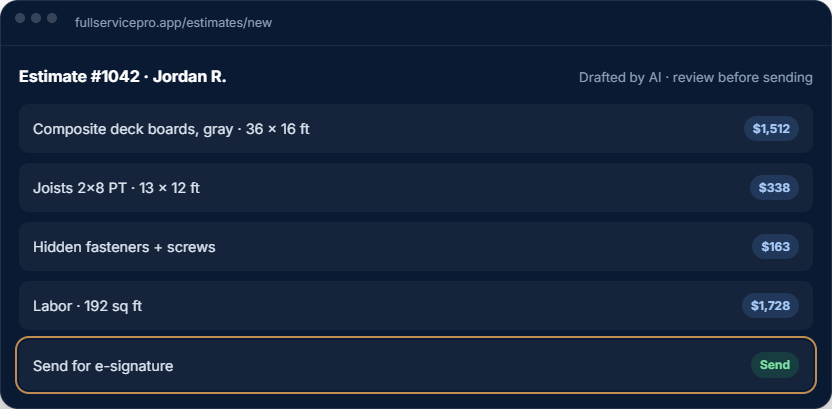
Describe the job or send a photo. The AI drafts the line items from your price book and your labor rates, and you check it before it goes out.
Jobber is a solid, widely used app. Full Service Pro is for owners who want the AI doing the office work: drafting priced estimates from your own price book, answering the calls you miss, and turning finished jobs into invoices.
14-day free trial · Run it next to Jobber before you switch.
Describe the job or send a photo. The AI drafts the line items from your price book and your labor rates, and you check it before it goes out.
When nobody picks up, the AI receptionist answers, asks about the job, transfers or takes a message, and puts the lead and the transcript in your inbox.
Compare included seats, field operations and communications before choosing a plan. Payroll, HR and accounting are separate options.
Framing cut lists and checked material calculators turn a scope into a materials list, so the estimate and the supply run match.
Photos, checklists and time punches save on the phone in a basement or a dead zone and sync when the signal comes back.
A GPS time clock, job costing and QuickBooks Online sync, with two-way texting, payroll and HR as add-ons when you want them.
Create a customer, price an estimate, schedule the work and prepare an invoice. Compare how each system handles the steps your team actually uses.
Include office and field seats, dispatch, GPS, phone, AI answering and expected usage. Full Service Pro’s AI estimating and AI phone answering have different inclusion rules.
Test a small customer import and rebuild a sample price-book entry. Confirm what happens to historical jobs, attachments and accounting records before cancelling your current service.
Read Jobber’s official product and pricing information alongside Full Service Pro’s current plans and usage rates. Compare the workflows you need; features and prices can change.
Full Service Pro is a separate product. The workflow preview below uses fictional sample data and makes no claim about Jobber’s current capabilities.
Open the sample job, review the draft estimate and follow it through approval, dispatch and invoicing. Use the software trial to test your own scope and prices.
Every plan includes AI estimate drafting. Field operations, job costing, phone, text and AI answering depend on the plan and add-ons you choose.
per month, billed monthly
1 seat, assign it as office or field
For an owner managing customers, estimates, scheduling and invoices. Add field operations or phone tools when you need them.
Try Starterper month, billed monthly
5 seats, with GPS and job costing
Includes field operations with GPS and dispatch, plus job costing. Phone, text and AI answering are optional additions.
Try Proper month, billed monthly
8 seats, with phone, text, and AI answering, then add seats
Includes field operations, job costing, phone, text and AI answering. Usage charges apply beyond included allowances.
Try TeamAnnual billing options are available. Extra seats, add-ons and communications usage can change your total. Payroll, HR and accounting are separate options. See current pricing, allowances and add-on rates.
The software trial lasts 14 days and requires no credit card. Check phone provisioning and usage terms before setting up live call answering.
Yes. Export your client list from Jobber as a spreadsheet and import it into Full Service Pro. You can also bring customers in from QuickBooks Online.
Yes. Create a trial with your business and contact details, with no credit card. You can run both side by side on real jobs before you decide.
No. The AI estimate assistant is included in every plan. Phone answering is the part billed by use, because each call costs us minutes and AI time.
No. It drafts estimates, texts and emails, and you approve anything that reaches a customer.
Free for 14 days. No credit card.
Jobber is a trademark of its owner. Full Service Pro isn't affiliated with Jobber.
No card, no sales call. If it doesn't save you time in two weeks, walk away.