
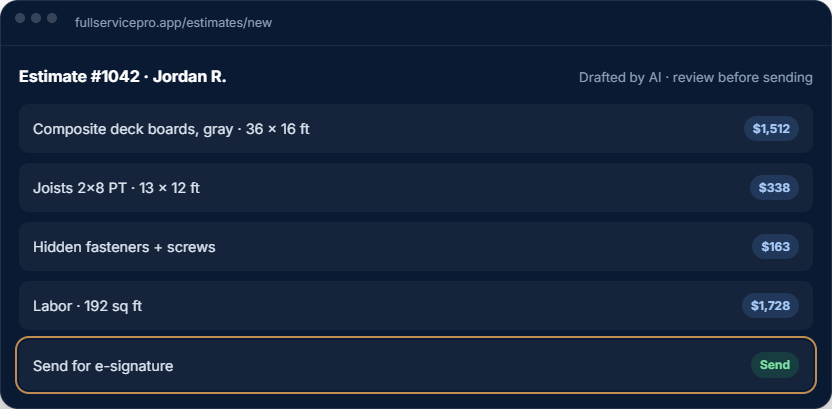
AI drafts the estimate
Tell it the job in plain words or send a photo. It builds the line items from your price book and labor rates, and nothing goes out until you approve it.
Housecall Pro is a popular choice for home service businesses. Full Service Pro includes AI estimate drafting on every plan and connects estimates to jobs and invoices. AI phone answering requires the business phone and the appropriate plan or add-ons.
14-day free trial · Run it next to Housecall Pro before you switch.
Prepared by the Full Service Pro team using our current plan details and Housecall Pro's official sources below. This is a vendor comparison, not an independent review or a hands-on test of Housecall Pro.
| Decision | Full Service Pro | Housecall Pro |
|---|---|---|
| One seat, monthly / annual equivalent | Full Service ProStarter: $79 monthly or $59/month billed yearly. | Housecall ProBasic: $79 monthly or $59/month billed yearly. [1] |
| Five seats, monthly / annual equivalent | Full Service ProPro: $189 monthly or $149/month billed yearly. | Housecall ProEssentials: $189 monthly or $149/month billed yearly. [1] |
| Eight seats, monthly / annual equivalent | Full Service ProTeam: $329 monthly or $299/month billed yearly. | Housecall ProMAX: $329 monthly or $299/month billed yearly. [1] |
| Scheduling, dispatch and GPS | Full Service ProScheduling in the core workflow. Field operations with GPS and dispatch on Pro and Team; optional on Starter. | Housecall ProBasic includes scheduling and dispatch; Essentials adds employee GPS. [1] |
| Estimate and invoice workflow | Full Service ProAI estimate drafting from your price book on every plan; review before sending. | Housecall ProEstimates, invoices and a price book on Basic. [1] |
| AI answering | Full Service ProWhen nobody picks up, asks about the job and transfers or takes a message. Included on Team; Starter and Pro need phone and answering add-ons. Usage applies. | Housecall ProCSR AI advertises call answering and job booking. Confirm the package and price with Housecall Pro. [2] |
| Accounting connection | Full Service ProQuickBooks Online connection. Confirm data mapping and the workflow in your trial. | Housecall ProAdvertises QuickBooks Online and Desktop integration. Verify plan requirements. [3] |
| Software trial | Full Service Pro14 days, no card. Live communications have separate setup and usage terms. | Housecall Pro14 days, no card. [1] |
[1] Housecall Pro pricing ? [2] Housecall Pro CSR AI ? [3] Housecall Pro QuickBooks integration ? Full Service Pro pricing, add-ons and usage.
Checked November 9, 2026. Annual equivalents require yearly billing. Promotions, tax, seats, communications and optional services can change the bill. A feature's presence does not establish that both products implement it the same way. Verify current terms directly.
Consider a trial if you want to draft estimates from your own price book and connect approved work to jobs and invoices. Test the optional field and office tools you need; include their cost in the comparison.
Our sample tour uses fictional data. Check the real application in your trial before committing your records or live communications.
If QuickBooks Desktop integration or AI job booking is essential, evaluate Housecall Pro's published options. Those capabilities are not claimed here for Full Service Pro.
If your current workflow already meets your needs, require a demonstrated improvement before taking on migration work. Compare a real task in both products rather than assuming equal-priced plans are equivalent.
For example, Full Service Pro Pro is $189/month for five seats. Adding the phone, text and answering bundle makes the subscription $238/month before applicable tax, setup and overage charges. Texting has a $79 one-time setup fee; communications usage beyond included allowances adds cost. Confirm the same requirements in a Housecall Pro quote rather than comparing $238 with a bare subscription.
List your office and field users, GPS, accounting needs, phone numbers, monthly call minutes and texting volume. Use each provider's current allowances and rates. Do not assume a trial includes live phone provisioning.
Tell it the job in plain words or send a photo. It builds the line items from your price book and labor rates, and nothing goes out until you approve it.
With AI answering on, a call nobody picks up still gets answered. It asks about the job, transfers or takes a message, and logs the call in your inbox.
The field app saves photos, checklists and time punches without a signal and syncs later, so a crawlspace doesn't stop the paperwork.
Room-by-room inspections with findings and photos, permit tracking, and workplace injury reports in the same app as the job.
In-house payroll, hire onboarding and PTO, plus job costing and QuickBooks Online sync, so the numbers come straight from the jobs.
Compare included seats, field operations and communications before choosing a plan. Payroll, HR and accounting are separate options.
Create a customer, price an estimate, schedule the work and prepare an invoice. Compare how each system handles the steps your team actually uses.
Include office and field seats, dispatch, GPS, phone, AI answering and expected usage. Full Service Pro’s AI estimating and AI phone answering have different inclusion rules.
Test a small customer import and rebuild a sample price-book entry. Confirm what happens to historical jobs, attachments and accounting records before cancelling your current service.
Read Housecall Pro’s official product and pricing information alongside Full Service Pro’s current plans and usage rates. Compare the workflows you need; features and prices can change.
Full Service Pro is a separate product. The workflow preview below uses fictional sample data and makes no claim about Housecall Pro’s current capabilities.
Open the sample job, review the draft estimate and follow it through approval, dispatch and invoicing. Use the software trial to test your own scope and prices.
Every plan includes AI estimate drafting. Field operations, job costing, phone, text and AI answering depend on the plan and add-ons you choose.
per month, billed monthly
1 seat, assign it as office or field
For an owner managing customers, estimates, scheduling and invoices. Add field operations or phone tools when you need them.
Try Starterper month, billed monthly
5 seats, with GPS and job costing
Includes field operations with GPS and dispatch, plus job costing. Phone, text and AI answering are optional additions.
Try Proper month, billed monthly
8 seats, with phone, text, and AI answering, then add seats
Includes field operations, job costing, phone, text and AI answering. Usage charges apply beyond included allowances.
Try TeamAnnual billing options are available. Extra seats, add-ons and communications usage can change your total. Payroll, HR and accounting are separate options. See current pricing, allowances and add-on rates.
The software trial lasts 14 days and requires no credit card. Check phone provisioning and usage terms before setting up live call answering.
Yes. Export your customer list as a spreadsheet and import it into Full Service Pro. You can also bring customers in from QuickBooks Online.
Yes. Create a trial with your business and contact details, with no credit card. You can run both on real jobs before you decide.
Yes, when you turn on AI answering. When nobody picks up, it answers, asks about the job, transfers or takes a message, and logs the transcript. It's billed by use.
It can. Payroll, HR and an accounting ledger are available in the same app, and it syncs with QuickBooks Online if you'd rather keep your books there.
Free for 14 days. No credit card.
Housecall Pro is a trademark of its owner. Full Service Pro isn't affiliated with Housecall Pro.
No card, no sales call. If it doesn't save you time in two weeks, walk away.